

The page looked perfect.
Beautiful navigation. Clean libraries. Hundreds of documents neatly stored.
And yet employees kept asking the same question.
“Where is the policy document?”
You have probably seen this before. SharePoint usage looks fine on the surface, leadership believes the intranet is working, and then someone asks a simple question. Why are we paying for Microsoft 365 licenses if employees still cannot find basic information?
A McKinsey study found that employees spend nearly 20 percent of their workweek searching for internal information. That is an entire day lost every week.
https://www.mckinsey.com/business-functions/mckinsey-digital/our-insights/the-social-economy
The uncomfortable truth is this.
Most organizations have no visibility into the content employees are trying to find but never do.
That blind spot is expensive.
The Invisible SharePoint Problem
Content sprawl rarely looks like a problem at first.
SharePoint grows naturally. Teams create sites. Libraries expand. HR uploads policies. Communications publishes news posts. Everything technically works.
But slowly something else starts happening.
Navigation entropy.
Employees stop trusting search. They bookmark random links. They ask coworkers instead. Or they simply recreate documents because they cannot find the original.
The system keeps growing. Adoption quietly drops.
And nobody notices.
That is the real problem.
Not missing content. Invisible content.
Why Native SharePoint Analytics Miss the Problem
Most administrators check SharePoint usage reports.
Page visits. Unique users. File views.
These numbers look healthy.
But they do not answer the critical question. What are employees trying to find but cannot?
Microsoft Search provides query analytics such as top search terms, abandoned queries, and searches with no results.
Helpful signals. Yes.
But there are limitations administrators run into quickly:
• Search reports are fragmented across sites
• Historical analysis is limited
• Behavioral context is missing
• There is no tenant wide discovery pattern analysis
You can see queries.
You cannot see the full behavioral journey behind them.
Which is exactly where the real insight lives.
The Behavioral Signals That Reveal Hidden Content
If employees cannot find content, the system always leaves clues.
The problem is knowing where to look.
Experienced SharePoint administrators watch for signals like these.
Search Abandonment
Someone searches.
They click nothing.
That usually means one of three things:
• No results appeared
• Results were irrelevant
• The content exists but is buried
Search abandonment is one of the clearest indicators of content discoverability problems.
Repeated Query Patterns
Look for queries that appear again and again.
Examples:
• HR policy
• Expense policy
• IT onboarding guide
When employees repeat the same query frequently, it often means the information is important but difficult to locate.
Queries With No Results
These are gold.
Search analytics will reveal terms where employees searched but the system returned nothing.
That tells you two things immediately.
Either the content does not exist.
Or the metadata structure is broken.
Navigation Dead Ends
Another overlooked signal.
Employees often land on a page and leave immediately.
That bounce behavior frequently indicates UI friction or poor information architecture.
The Cost of Unfindable Content
This is where the problem stops being theoretical.
When employees cannot find information, real operational costs appear.
Common patterns across Microsoft 365 tenants:
• Duplicate documents created repeatedly
• HR policies stored in multiple locations
• Project documentation scattered across Teams and SharePoint
• Internal communication buried under outdated content
The result is not just inconvenience.
It is digital workplace friction.
Over time this leads to something administrators recognize immediately.
Adoption fatigue.
Employees stop trying.
Diagnosing the Root Cause
Finding the problem is only half the battle.
Understanding why the content is hidden requires deeper analysis.
In most tenants the causes fall into predictable categories.
Content Sprawl
Too many sites. Too many libraries.
Governance rarely keeps pace with collaboration growth.
Symptoms:
• Multiple versions of the same document
• Inconsistent naming conventions
• Duplicate team sites
Metadata Failure
Search works through the index.
If metadata structures are inconsistent, discoverability collapses.
Symptoms:
• Poorly configured managed properties
• Missing taxonomy fields
• Unstructured libraries
Permission Barriers
Sometimes the content exists.
Employees simply cannot see it.
Permissions are one of the most common causes of missing search results in SharePoint environments.
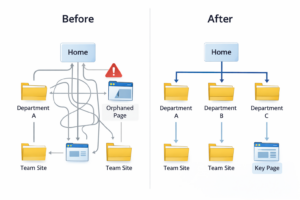
Navigation Design
Even with good search, navigation matters.
Poor intranet architecture leads to:
• Orphaned content
• Hidden pages
• Circular navigation paths
Where Analytics Changes the Equation
At some point administrators hit a wall.
Native reporting shows activity counts.
But it cannot explain behavior.
This is where deeper SharePoint analytics becomes essential.
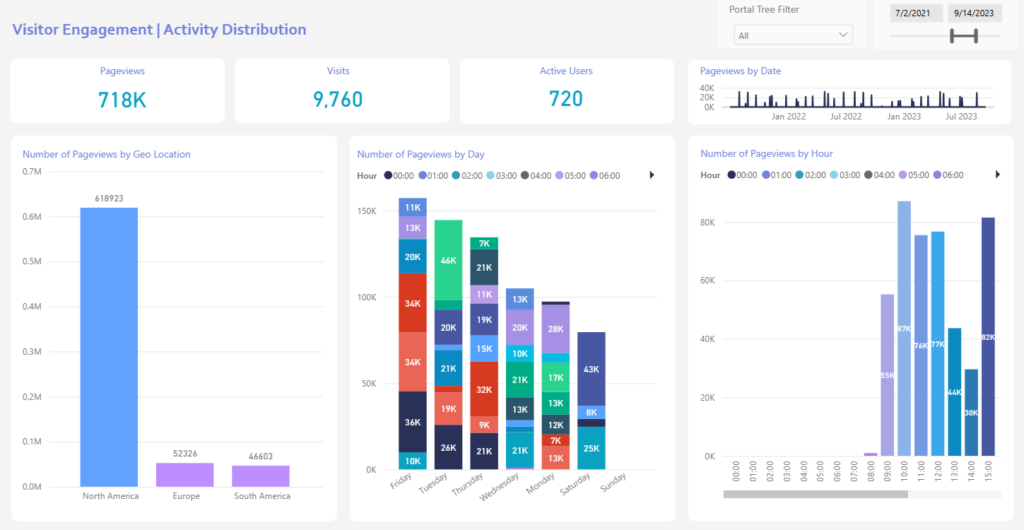
A behavioral analytics platform can reveal patterns that standard usage reports miss:
• Content employees search for but never open
• Documents frequently searched but rarely accessed
• Content that drives engagement vs content ignored
• Navigation paths that lead to dead ends
For organizations focused specifically on SharePoint intranet performance, this is exactly where CardioLog Analytics becomes valuable.
It provides dedicated SharePoint analytics such as:
• Search behavior tracking
• SharePoint heatmaps
• Content engagement analysis
• Navigation journey insights
Not just page views.
Actual user behavior.
The Governance Layer Most Organizations Skip
Here is something rarely discussed.
SharePoint analytics is not just about reporting.
It is about governance clarity.
Once you identify hidden or unfindable content, operational decisions become easier.
High performing tenants typically implement policies such as:
• Quarterly content audits
• Search analytics reviews
• Document lifecycle rules
• Ownership assignment for key intranet pages
Without analytics these initiatives rely on guesswork.
With analytics they become measurable.
A Quick Story From the Field
A digital workplace owner once told me something that stuck.
Their leadership believed the intranet was working perfectly. Usage numbers were strong. The communications team kept publishing.
Then analytics revealed something odd.
The most searched phrase in the company was “vacation policy”.
The document existed. It was buried four layers deep in a library.
Employees were searching for it hundreds of times every month.
That single insight triggered a redesign of the HR intranet section.
One page moved. One navigation change.
Search abandonment dropped almost immediately.
Sometimes the problem is not complex.
It is just invisible.
What High Performing SharePoint Environments Do Differently
Organizations that manage SharePoint successfully treat discoverability as an operational metric.
Not a UX preference.
They monitor signals continuously.
Typical practices include:
• Monitoring search abandonment trends
• Identifying high demand queries with poor click rates
• Tracking content engagement over time
• Mapping employee navigation journeys
Over time this produces something extremely valuable.
Governance clarity.
Teams understand which content matters, which content is ignored, and where digital workplace friction appears.
That visibility also supports broader Microsoft 365 strategies such as:
• license optimization
• measurable adoption
• improved collaboration workflows
• stronger intranet governance
The result is a digital workplace that actually works.
Not just one that looks organized.
Where This Is Headed
SharePoint environments are expanding faster than most organizations realize.
Add Teams. Add Copilot. Add more collaboration spaces.
Content growth accelerates.
Without behavioral analytics, discoverability problems multiply quietly in the background.
The next phase of digital workplace maturity is not more dashboards.
It is understanding employee behavior across the platform.
Which content people need.
Which content they cannot find.
And which content the organization should probably delete.
If you want to see how deeper SharePoint analytics can uncover these insights, you can explore how CardioLog Analytics analyzes search behavior, content engagement, and intranet navigation.
Or see how organizations measure Microsoft 365 adoption analytics across the entire tenant.
The fastest way to understand what employees cannot find is simple.
Start measuring it.
Schedule a demo or start a trial to see how SharePoint analytics can expose hidden content discovery problems inside your tenant.






 Follow @cardiolog