

Choosing the right SharePoint analytics tool is no longer a technical decision. It is a business-critical one.
Organizations rely on SharePoint as a central hub for content, collaboration, and communication. But without proper analytics, it is impossible to understand how that content is actually used, where engagement is happening, and what needs improvement.
In this guide, we compare the best SharePoint analytics tools in 2026, so you can choose the right solution for your needs.
What to Look for in a SharePoint Analytics Tool
Before comparing tools, it is important to understand what actually matters.
A strong SharePoint analytics platform should provide:
- Clear visibility into user behavior, not just activity logs
- Actionable insights, not just raw data
- Support for Microsoft 365 beyond SharePoint
- Real-time dashboards and reporting
- Security and compliance tracking
- Tools to improve adoption, not just measure it
Most built-in SharePoint reports fall short in these areas.
Best SharePoint Analytics Tools
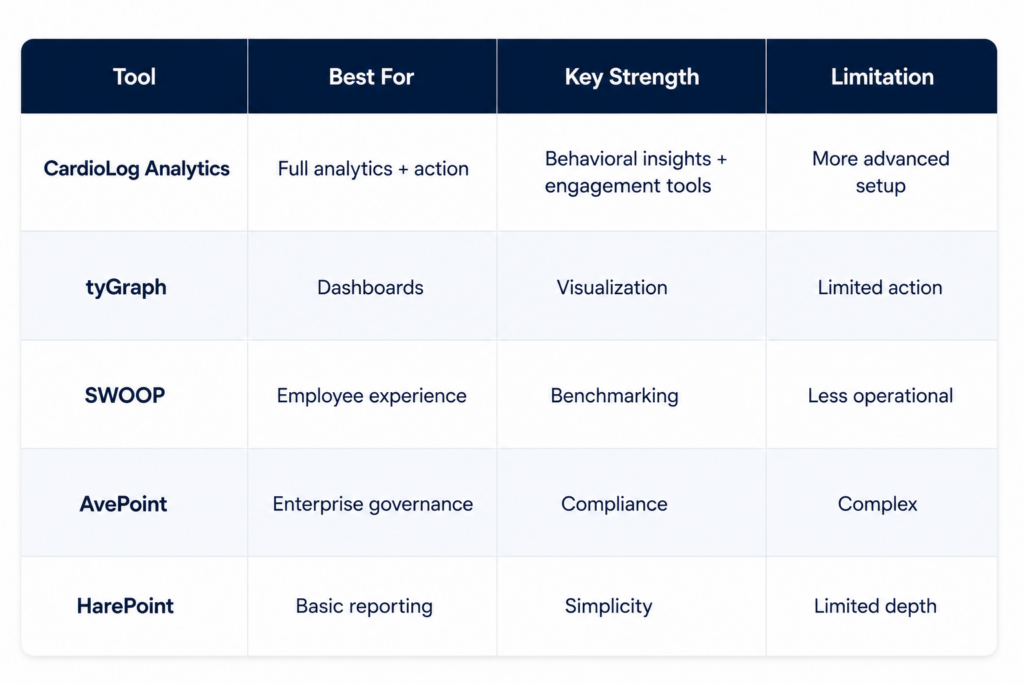
1. CardioLog Analytics
Best for
Organizations that want full visibility and the ability to act on insights.
Key Features
- Deep SharePoint usage and engagement tracking
- Microsoft 365 analytics across Teams, OneDrive, and more
- Behavioral insights and user journey tracking
- AI-driven heatmaps
- Built-in engagement tools like popups and targeting
- Gamification to drive adoption
Strengths
- Goes beyond reporting and enables action
- Strong focus on improving adoption and engagement
- Broad Microsoft 365 coverage
Limitations
- More advanced than basic reporting tools, may require initial setup effort
2. tyGraph
Best for
Organizations focused on dashboards and visualization.
Key Features
- Clean SharePoint dashboards
- Microsoft Teams and SharePoint insights
- Prebuilt reports
Strengths
- Easy to use
- Good visual dashboards
Limitations
- Limited action capabilities
- Focused more on reporting than engagement
3. SWOOP Analytics
Best for
Employee experience and collaboration insights.
Key Features
- Collaboration analytics
- Benchmarking reports
- Organizational network insights
Strengths
- Strong research and benchmarking
- Focus on employee experience
Limitations
- Less operational and actionable
- Limited engagement tools
4. AvePoint Analytics
Best for
Large enterprises focused on governance and compliance.
Key Features
- Governance analytics
- Usage tracking
- Security insights
Strengths
- Enterprise-grade platform
- Strong compliance features
Limitations
- Less focused on engagement and behavior
- Can be complex to implement
5. HarePoint Analytics
Best for
Basic SharePoint reporting needs.
Key Features
- Usage reports
- Activity tracking
Strengths
- Simple and straightforward
Limitations
- Limited depth
- Not suitable for advanced analytics or engagement
Comparison Table
Why Built-In SharePoint Analytics Is Not Enough
SharePoint’s native analytics provides basic metrics such as page views and site visits.
However, it lacks:
- User behavior tracking
- Cross-platform visibility across Microsoft 365
- Engagement insights
- Actionable recommendations
- Tools to improve adoption
This is why most organizations turn to third-party analytics platforms.
How to Choose the Right Tool
Choose based on your primary goal:
- Improve adoption and engagement
→ CardioLog Analytics - Visual dashboards and quick insights
→ tyGraph - Employee experience analysis
→ SWOOP - Governance and compliance
→ AvePoint - Basic reporting
→ HarePoint
Final Thoughts
The best SharePoint analytics tool is not just the one that shows you data. It is the one that helps you act on it.
If your goal is to:
- understand real user behavior
- improve collaboration
- increase adoption
- optimize content
then you need more than reports. You need a platform that turns insights into action.
If you want to see how advanced SharePoint analytics works in practice, explore how CardioLog Analytics helps organizations turn Microsoft 365 data into measurable results.
Explore the complete guide to SharePoint analytics and reporting.










 Follow @cardiolog