

The dashboard looked impressive.
Then leadership asked the question nobody in the room could answer:
“Are we actually getting value from Copilot?”
You can probably guess what happened next. Silence. A few guesses. Someone opened the Microsoft admin center. Someone else mentioned adoption numbers that had nothing to do with productivity. Meanwhile, the organization was paying for AI licenses nobody could confidently justify.
That is becoming very common.
According to Microsoft’s 2024 Work Trend Index, 75% of knowledge workers are already using AI at work in some capacity. Yet most organizations still lack visibility into whether AI is improving productivity or simply amplifying existing content chaos.
https://www.microsoft.com/en-us/worklab/work-trend-index
And that chaos usually starts in SharePoint.
The Real Problem Is Not Copilot
Everyone says Copilot will fix productivity.
It will not. Not by itself.
Microsoft 365 Copilot depends entirely on the quality of the content sitting underneath it:
- SharePoint Online
- Teams
- OneDrive
- Exchange
- Viva Engage
If your tenant contains outdated documents, duplicate files, abandoned sites, navigation entropy, and content sprawl, AI has no way of distinguishing valuable information from noise.
That becomes dangerous fast.
Employees start receiving:
- irrelevant AI responses
- outdated recommendations
- conflicting answers
- low confidence search results
Trust drops quickly. Adoption follows.
Then comes the uncomfortable budget conversation around unused Copilot licenses.
This is the part many organizations underestimate.
AI does not clean your environment.
It exposes it.
Why Native Microsoft 365 Analytics Are Not Enough
Most native reporting focuses on activity counts.
Logins. Views. Message totals. File counts.
That tells you almost nothing about behavioral quality.
You still cannot answer critical operational questions like:
- Which SharePoint sites are actively driving collaboration?
- Which content employees actually rely on?
- Where search abandonment is highest?
- Which departments demonstrate AI readiness?
- Which users are likely to become expensive ghost licenses?
This is where tenant-level analytics becomes essential.
Not reporting. Analytics.
There is a difference.
Organizations preparing for AI rollout need behavioral visibility across:
- SharePoint
- Teams
- OneDrive
- Search
- Navigation
- User journeys
- Content engagement
- Adoption trends
Without that visibility, Copilot deployment becomes guesswork dressed up as innovation.
That sounds harsh. But it is true.
The Hidden Cost of Content Sprawl
Most enterprises dramatically underestimate how much inactive content exists inside SharePoint.
One global manufacturer we spoke with recently discovered nearly 40% of their SharePoint sites had not been meaningfully accessed in over a year. Thousands of documents. Still indexed. Still searchable. Still sitting there waiting for AI to surface them.
Nobody knew.
This is the operational problem behind the “data swamp” conversation.
Inactive content creates:
- search friction
- governance complexity
- compliance risk
- UI friction
- poor AI relevance
- licensing inefficiency
And unfortunately, SharePoint environments rarely clean themselves.
Content accumulates quietly over time:
- abandoned project sites
- duplicate HR policies
- inactive Teams
- outdated onboarding material
- forgotten departmental libraries
Then AI enters the picture and suddenly all that digital clutter becomes visible again.
At scale.
Measuring Copilot Adoption Without Guesswork
One of the biggest frustrations among IT leaders right now?
Leadership wants ROI proof before the organization even understands baseline behavior.
Fair enough.
You cannot measure improvement if you never measured the “before.”
This is where behavioral analytics changes the conversation completely.
Platforms like CardioLog Analytics help organizations establish measurable baselines around:
- search efficiency
- collaboration behavior
- navigation friction
- inactive content
- content engagement
- Teams activity
- SharePoint adoption
- cross-workload usage patterns
That matters because after rollout, organizations can finally answer:
- Did search abandonment decrease?
- Are users navigating faster?
- Did collaboration improve?
- Are Copilot users actually more productive?
- Which business units demonstrate measurable gains?
Without baseline measurement, AI ROI becomes mostly opinion.
And opinions do not survive budget reviews very long.
For organizations specifically focused on SharePoint intranet optimization, CardioLog Essentials provides SharePoint-focused analytics visibility without requiring full tenant-level deployment.
Different use case. Same problem being solved.
Search Abandonment Is an AI Warning Sign
Search behavior tells you more about AI readiness than most organizations realize.
If employees repeatedly search for the same information without clicking results, that indicates:
- poor metadata
- weak intranet governance
- navigation problems
- missing content
- search abandonment
- low information trust
Those same problems directly affect AI-generated responses.
If users already cannot find trusted information manually, why would they trust AI-generated answers built on top of the same environment?
They will not.
This is why high-performing tenants focus heavily on:
- search optimization
- content governance
- navigation simplification
- behavioral analytics
before expanding AI initiatives.
Not afterward.
A lot of AI discussions skip this part because it is less exciting than demo videos. But operationally, this is where success or failure usually gets decided.
For additional guidance around SharePoint governance optimization, this article on intranet governance strategy explains why behavioral visibility matters long before migration or AI deployment begins:
https://blog.intlock.com/sharepoint-governance-best-practices/
License Optimization Is Becoming a Board-Level Conversation
Copilot licensing costs add up very quickly.
Especially in enterprise environments spanning thousands of users across multiple M365 licensing tiers.
The problem?
Many organizations are assigning licenses broadly without understanding:
- who actively collaborates
- who engages with knowledge systems
- who already demonstrates digital maturity
- who barely uses Microsoft 365 at all
That creates ghost licenses.
Expensive ones.
Behavioral analytics allows organizations to identify:
- high-engagement users
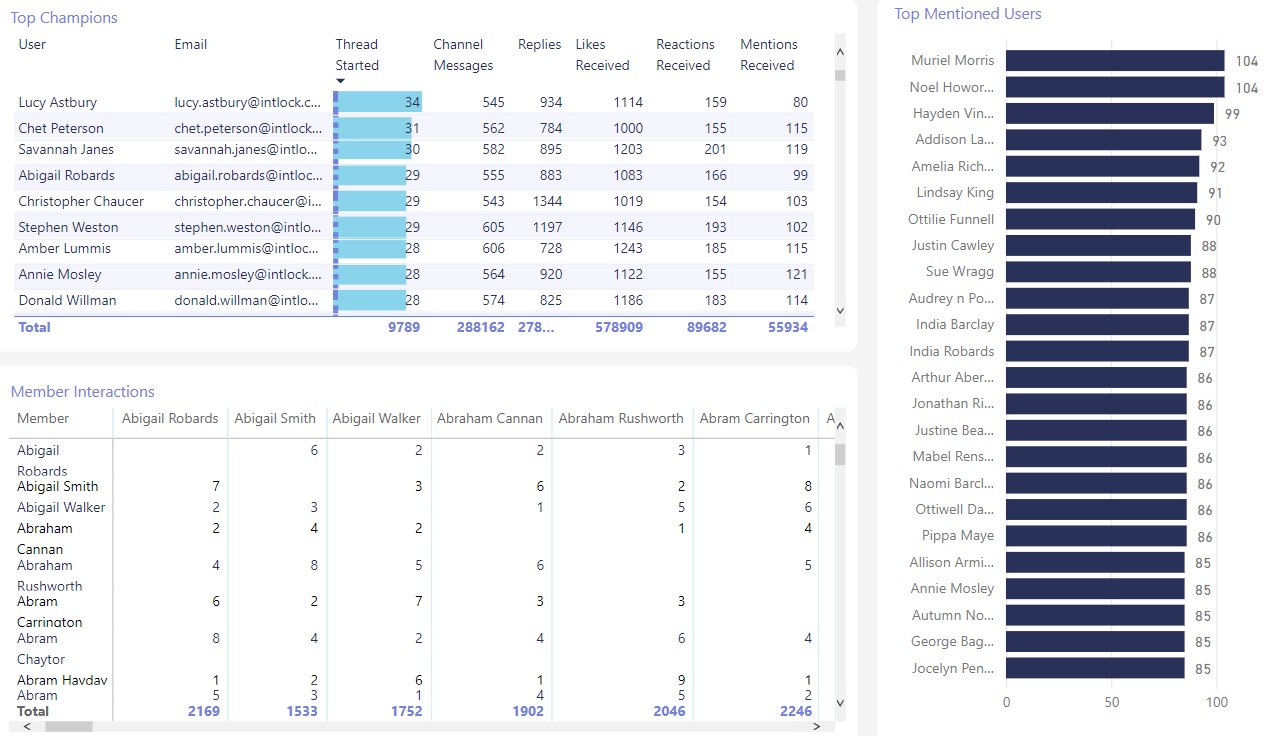
- influential Teams collaborators
- heavy search users
- active SharePoint contributors
- departments with strong adoption patterns
This supports far smarter rollout planning.
Instead of licensing everyone immediately, organizations can prioritize:
- high-collaboration departments
- operationally mature teams
- digital champions
- knowledge-heavy business units
That produces better adoption and significantly cleaner ROI visibility.
We covered a similar issue in this article about Microsoft Teams adoption analytics and collaboration measurement:
https://blog.intlock.com/microsoft-teams-analytics/
Why Behavioral Analytics Matters More Than Dashboard Counts
Many analytics platforms still focus heavily on static dashboards.
That is no longer enough.
Organizations need visibility into behavior:
- how employees move through SharePoint
- where navigation breaks down
- where users abandon searches
- which pages create friction
- what content actually influences productivity
This is where solutions like CardioLog Analytics separate themselves from generic reporting platforms.
Not because of prettier dashboards.
Because of operational depth.
Capabilities like:
- user journey analysis
- heatmaps
- page interaction tracking
- navigation analytics
- tenant-level reporting
- adoption intelligence
- cross-workload analytics
become incredibly valuable during AI rollout planning.
Especially when leadership starts asking difficult questions.
And they will.
For organizations evaluating broader Microsoft 365 analytics maturity, this Microsoft documentation provides additional context around Copilot readiness requirements:
https://learn.microsoft.com/en-us/copilot/microsoft-365/microsoft-365-copilot-setup
What High-Performing Tenants Do Differently
The organizations succeeding with AI right now are not necessarily deploying Copilot the fastest.
They are preparing their environments the most intelligently.
They focus heavily on:
- license optimization
- governance clarity
- search quality
- behavioral visibility
- intranet usability
- measurable adoption
- content relevance
And honestly, they are less distracted by AI hype.
That helps.
Because eventually every organization reaches the same realization:
AI does not create value from clutter.
It creates value from trusted information, healthy collaboration patterns, and environments employees already rely on daily.
Everything else becomes noise.
Schedule a Personalized AI Readiness Demo
Want to see how your Microsoft 365 environment is actually performing before expanding Copilot deployment?
Schedule a one-on-one demo with the CardioLog team and see how behavioral analytics can help you:
- identify inactive SharePoint content
- reduce AI noise
- optimize Copilot licensing
- improve search and navigation
- measure adoption properly
- build a measurable AI readiness strategy










 Follow @cardiolog