

The traditional divide between IT and business teams is disappearing.
For years, IT focused primarily on technology, infrastructure, security and platform management, while marketing and communications teams concentrated on messaging, engagement and reaching the right audiences.
Today, those responsibilities increasingly overlap.
Microsoft 365 has become a central part of how employees communicate, collaborate, find information and get work done. SharePoint, Microsoft Teams, OneDrive, Viva Engage and Microsoft 365 Copilot all generate valuable signals about how employees actually use the digital workplace.
That makes analytics a shared language between IT, internal communications, digital workplace teams and business leaders.

Microsoft 365 Has Made User Adoption a Shared Responsibility
Deploying technology is no longer enough.
Organizations can roll out SharePoint, Microsoft Teams or Microsoft 365 Copilot successfully from a technical perspective and still struggle with low adoption, poor engagement or underutilized licenses.
IT teams need to understand whether platforms are performing as intended.
Internal communications and digital workplace teams need to understand whether employees are finding, consuming and engaging with the right content.
Business leaders need evidence that investments in Microsoft 365 are delivering measurable value.
These are different questions, but they depend on the same thing: accurate information about user behavior.
Microsoft 365 Analytics Creates a Common View of User Behavior
Microsoft 365 analytics can help teams move beyond assumptions and understand how employees are actually interacting with the digital workplace.
With CardioLog Analytics, organizations can analyze user behavior across SharePoint and Microsoft 365 to answer questions such as:
- Which SharePoint pages and content are receiving the most engagement?
- Which content is being ignored or underutilized?
- How are employees navigating through the intranet?
- What are users searching for?
- Where are users abandoning journeys or struggling to find information?
- Which teams, departments or groups are actively adopting Microsoft 365?
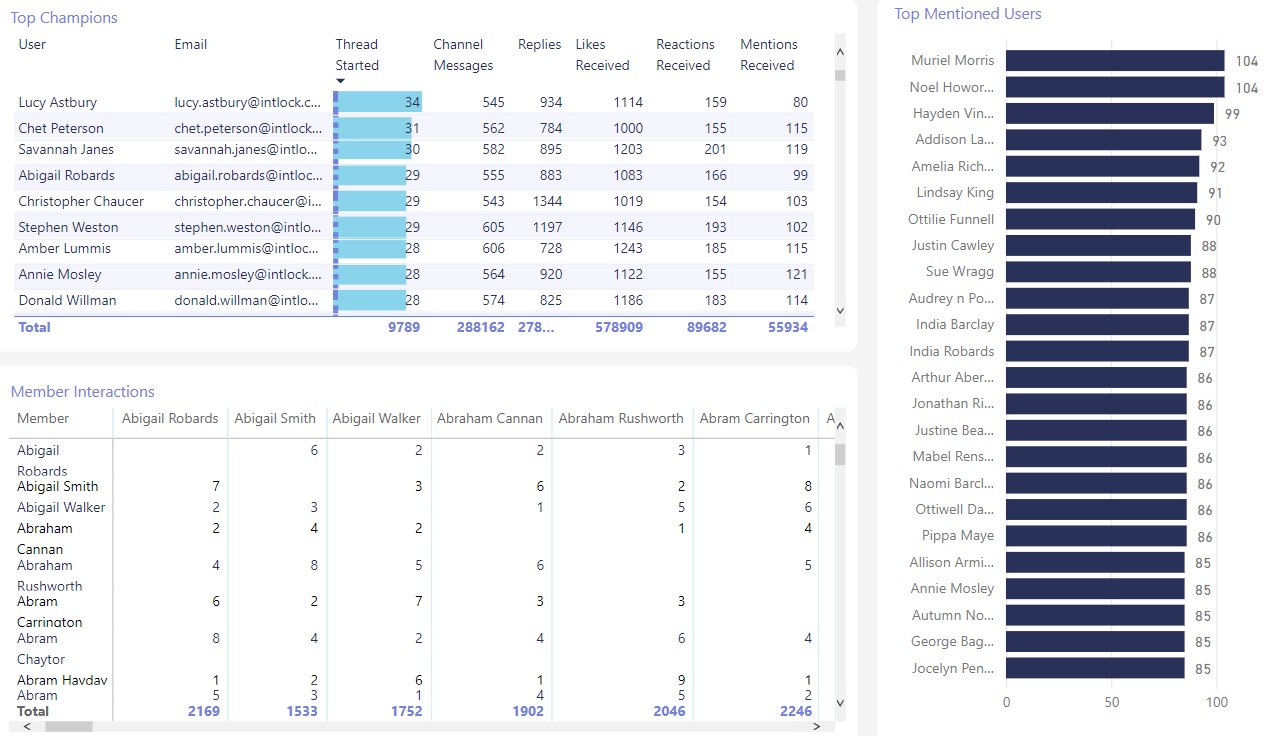
- How are employees collaborating across Teams and other Microsoft 365 applications?
- Where are adoption gaps appearing?
- Which users or departments may require additional training or communication?
Instead of IT, communications and business teams working with disconnected assumptions, they can use behavioral data to identify common priorities
SharePoint Analytics Connects Content Decisions With Real User Behavior
SharePoint remains a central platform for corporate intranets, knowledge management and employee communication.
However, page views alone provide only part of the picture.
Organizations need to understand what happens before, during and after a visit.
SharePoint analytics can reveal how employees navigate between pages, which content attracts attention, what people search for and where engagement begins to decline.
This information can help content owners and digital workplace teams determine which pages should be improved, promoted, consolidated or retired.
CardioLog Analytics also provides visual behavioral analysis through capabilities such as heat maps, click maps and scroll maps, helping teams understand how employees interact with individual SharePoint pages.
The result is a much clearer connection between content strategy and actual employee behavior.
Copilot Makes Cross-Team Analytics Even More Important
The introduction of Microsoft 365 Copilot has made this collaboration between technology and business teams even more important.
Purchasing and assigning Copilot licenses is only one part of a successful AI rollout.
Organizations also need to understand whether employees have the Microsoft 365 usage patterns, collaboration habits and accessible content required to benefit from Copilot.
They then need to measure what happens after deployment.
CardioLog Analytics provides Copilot analytics designed to help organizations assess readiness, measure adoption and evaluate Microsoft 365 Copilot utilization.
Organizations can examine factors including:
- Copilot readiness across users and departments
- Active Copilot adoption and usage trends
- Copilot engagement across Microsoft 365 applications
- High-potential users and groups
- Employees who may require additional adoption support
- Inactive or underutilized Copilot licenses
- License utilization and cost-efficiency indicators
- SharePoint Agents usage and engagement
This gives IT, adoption teams and business leaders a common framework for evaluating whether Copilot is being successfully incorporated into everyday work.
From Analytics to Action
Analytics is most valuable when organizations can act on what they discover.
For example, analytics may reveal that a new SharePoint resource receives little traffic, that a department is underutilizing a Microsoft 365 application or that a specific employee group requires additional guidance.
CardioLog Engage allows organizations to use behavioral and organizational data to target specific employee audiences with relevant communications and adoption campaigns.
Instead of sending the same message to everyone, teams can segment employees according to factors such as department, role or previous behavior.
This creates a direct connection between measurement and action:
Measure behavior. Identify an adoption gap. Target the relevant audience. Measure the response.
That feedback loop can help IT and communications teams continuously improve Microsoft 365 adoption rather than treating adoption as a one-time launch activity.
A Shared Measurement Framework for the Digital Workplace
The strongest Microsoft 365 strategies are increasingly cross-functional.
IT provides the technology and governance.
Digital workplace teams shape the employee experience.
Internal communications teams help employees discover and understand important information.
Business leaders evaluate productivity, adoption and return on investment.
Analytics connects these responsibilities.
Instead of each team using separate measures of success, organizations can establish a shared understanding of how employees use Microsoft 365 and where improvements are required.
For example, an intranet page with low engagement is not simply a communications problem. It may indicate poor navigation, weak search visibility, irrelevant content or an adoption issue.
An underutilized Copilot license is not simply an IT licensing issue. It may indicate insufficient training, unsuitable user targeting or broader Microsoft 365 adoption barriers.
The data provides the starting point for identifying the real problem.
Build a More Data-Driven Microsoft 365 Strategy
The conversation between IT and business teams has changed significantly.
The challenge is no longer simply connecting technology with marketing.
It is understanding how technology, content, communication, collaboration and AI adoption work together across the entire digital workplace.
CardioLog Analytics provides behavioral analytics across SharePoint and Microsoft 365 to help organizations understand adoption, engagement, navigation, content performance and user behavior.
With additional visibility into Microsoft 365 Copilot readiness, adoption and license utilization, organizations can use those insights to make better decisions about where to invest, what to improve and which users need additional support.
When IT, communications and business teams work from the same behavioral data, Microsoft 365 analytics becomes more than a reporting tool.
It becomes a shared framework for improving the digital employee experience.

Ready to understand how employees are really using Microsoft 365?
Explore CardioLog Analytics for SharePoint and Microsoft 365 or request a personalized demo.
Related Topic: The Benefits of using SharePoint and its Amazing Features









 Follow @cardiolog