

A SharePoint migration is more than a technical content move. It is an opportunity to clean up outdated information, improve the employee experience, modernize collaboration, and make SharePoint easier to use.
Whether you are moving from SharePoint Server to SharePoint Online, reorganizing sites, consolidating intranet content, or modernizing your Microsoft 365 environment, the real question is not only whether the content moved successfully.
The bigger question is: are employees using the new environment successfully?
Migration tools can help move files, libraries, lists, and sites. Microsoft’s SharePoint Migration Tool, for example, helps migrate content from on-premises SharePoint Server sites, document libraries, and file shares to SharePoint in Microsoft 365.
But migration tools alone do not tell you whether users are finding content, engaging with pages, adopting the new portal, or experiencing friction after launch.
That is where SharePoint migration analytics become essential.
Analytics help teams understand what content is worth migrating, how users respond during rollout, and whether the new SharePoint environment is delivering value after launch.
Why Analytics Matter in a SharePoint Migration
Many organizations approach migration as a technical project: move the content, validate permissions, check broken links, and launch the new environment.
Those steps matter, but they are not enough.
A successful SharePoint migration also requires visibility into:
- Which content is still used
- Which pages and documents can be archived
- Which departments rely most on SharePoint
- Whether employees can find what they need after migration
- Which sites drive adoption
- Where engagement drops after launch
- Whether search, navigation, and content structure are working
Without analytics, teams may migrate too much content, preserve outdated structures, and miss early signs that users are struggling.
Microsoft also emphasizes planning and assessment as key parts of migration, including scanning source environments before migration to identify issues that may affect the move.
Analytics add another layer: they show how employees actually use the content and whether the new environment supports real adoption.
1. Before Migration: Identify What to Keep, Improve, Archive, or Delete:
Before migrating content, teams should evaluate the current SharePoint environment.
This stage helps answer:
- What content is actively used?
- Which pages have low or no engagement?
- Which documents are outdated?
- Which sites still support important business processes?
- Which content should be promoted in the new environment?
- Which content should not be migrated at all?
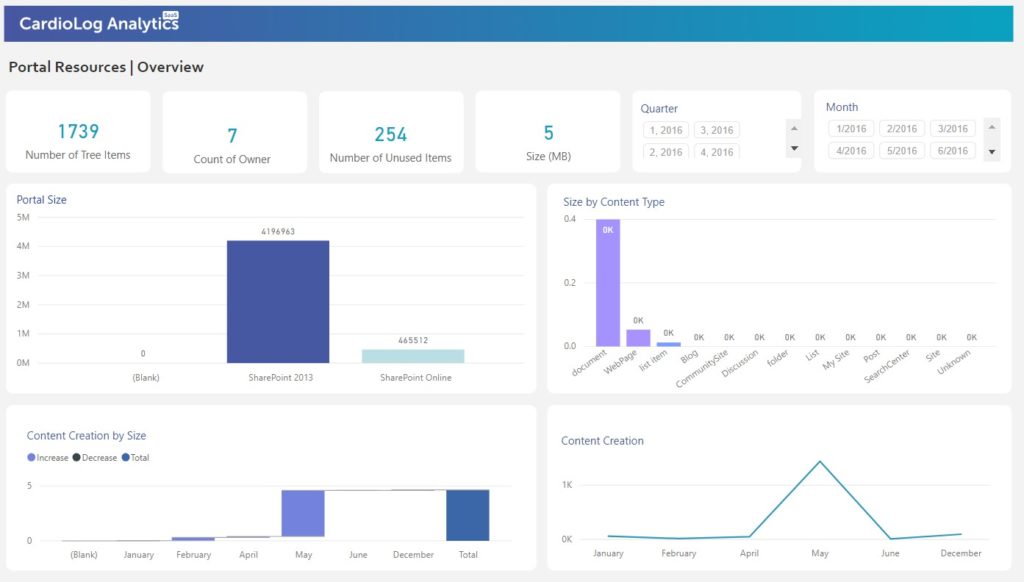
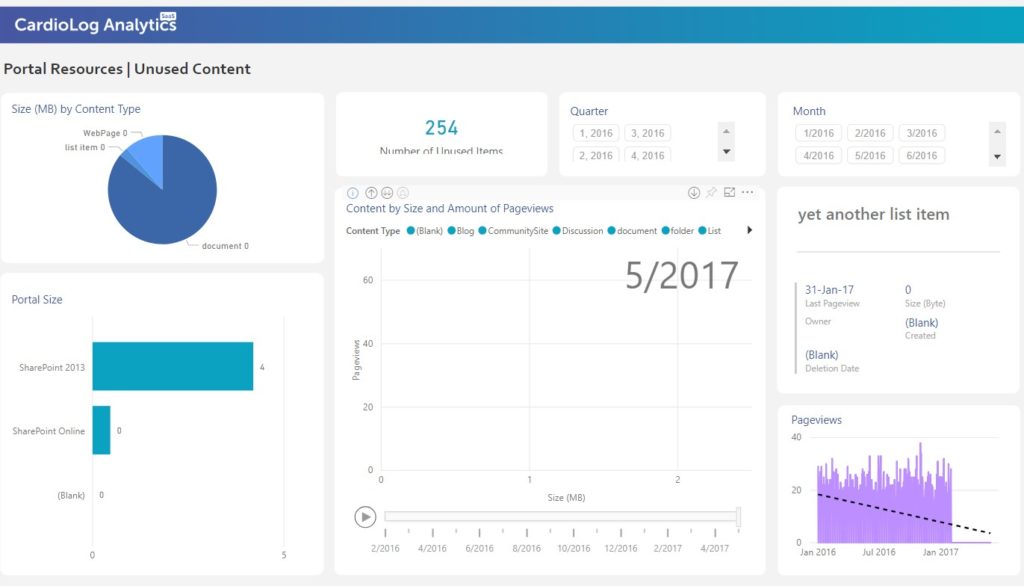
CardioLog Analytics can help teams assess content usage before migration by identifying popular pages, active sites, unused content, search behavior, and user engagement patterns.
This helps organizations avoid the common mistake of moving everything.
Instead of carrying years of outdated or unused content into the new environment, teams can make better decisions based on real usage data.
Useful pre-migration analytics include:
- Portal size and site activity
- Most visited pages
- Least visited or unused content
- Search terms and failed searches
- Content engagement by department or audience
- Navigation paths and user journeys
- Document and page activity trends
This information helps reduce migration scope, improve content governance, and create a cleaner SharePoint environment from day one.
2. During Migration: Communicate With Users and Capture Feedback
During migration, communication is just as important as technical execution.
Employees need to know what is changing, where to find information, how to use the new environment, and what to do if something is missing.
This is where targeted communication and user feedback can improve the migration experience.
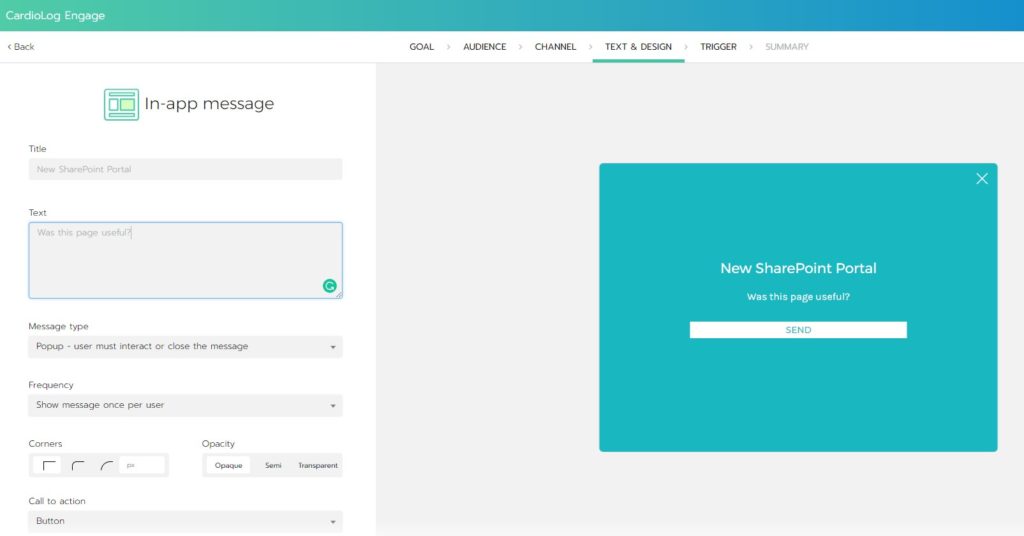
CardioLog Engage can help organizations communicate with specific SharePoint audiences during migration by delivering targeted messages, surveys, notifications, and feedback prompts.
For example, teams can use targeted campaigns to ask:
- Did you find the content you were looking for?
- Is anything missing from the new site?
- Is the new navigation clear?
- Are you experiencing access or permission issues?
- Do you need help using the new SharePoint experience?
Feedback during the migration helps teams identify adoption issues early, before frustration spreads across the organization.
This is especially useful for phased migrations, department-by-department rollouts, or intranet redesigns where different audiences may experience different levels of change.
During migration, useful engagement signals include:
- Campaign response rates
- User feedback by department or audience
- Training content engagement
- Visits to migration support pages
- Search activity for migration-related topics
- Drop-offs from important pages
- Repeated visits to help or support content
The goal is to make the migration feel simple for users, even when the technical project is complex behind the scenes.
3. After Migration: Measure Adoption and Validate Success
Once the migration is complete, analytics become critical for measuring success.
A migration should not be considered successful only because content was moved. It should be considered successful when users can find information, complete tasks, and engage with the new SharePoint environment effectively.
Post-migration analytics help answer:
- Are users visiting the new SharePoint environment?
- Has adoption increased or decreased compared to before migration?
- Which sites, pages, and documents are performing well?
- Which content is being ignored?
- Are users relying heavily on search because navigation is unclear?
- Are failed searches increasing?
- Are users engaging with the pages and links they need?
- Which departments need additional training or communication?
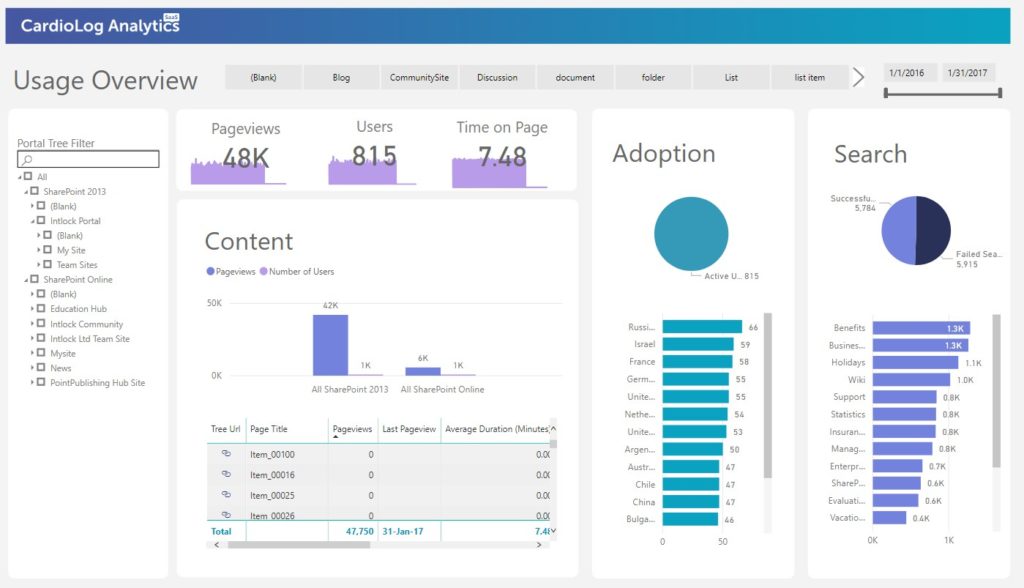
CardioLog Analytics can compare usage before and after migration, helping teams identify what improved, what declined, and where action is needed.
Useful post-migration reports include:
- Adoption overview
- Usage trends
- Page and site engagement
- Search analytics
- Failed search terms
- Navigation path analysis
- Popular and unused content
- User activity by department or audience
- Device and browser usage
- Web part or page component engagement
This makes it possible to move beyond technical validation and measure actual user adoption.
Key SharePoint Migration Metrics to Monitor
To evaluate whether a SharePoint migration is working, monitor metrics across three categories: content, adoption, and experience.
Content Metrics
Track which content is useful, outdated, or ignored.
Important metrics include:
- Most visited pages and documents
- Unused content
- Site activity
- Content age
- Content engagement trends
- Search terms connected to missing or hard-to-find content
Adoption Metrics
Measure whether users are moving into the new environment.
Important metrics include:
- Active users
- New versus returning users
- Visits and sessions
- Adoption by department, location, or audience
- Usage before versus after migration
- Training page engagement
- Campaign and communication engagement
Experience Metrics
Understand whether the new SharePoint environment is easy to use.
Important metrics include:
- Search usage
- Failed search terms
- Click paths
- Drop-off points
- Time on page
- Web part engagement
- Feedback survey responses
- Support content visits
Together, these metrics show whether the migration improved the digital workplace or simply moved the same problems into a new environment.
SharePoint Migration Is Also a Content Strategy Project
One of the biggest risks in any SharePoint migration is moving too much content.
Old pages, outdated files, duplicate documents, abandoned sites, and irrelevant links can make the new environment feel cluttered immediately after launch.
Analytics helps teams make better decisions before the move.
Instead of asking, “Can we migrate this?” teams should ask:
- Is this content still being used?
- Is it still accurate?
- Is it easy to find?
- Does it support current business needs?
- Should it be archived, rewritten, merged, or deleted?
This approach reduces clutter and improves the quality of the new SharePoint environment.
Microsoft’s migration guidance also highlights the importance of planning and notes that migrating content can create network activity as large volumes of data move to SharePoint and OneDrive.
Reducing unnecessary content is not only good for users. It can also make the migration more manageable.
How CardioLog Analytics Supports SharePoint Migration
CardioLog Analytics helps organizations measure SharePoint usage, adoption, engagement, and content performance before, during, and after migration.
Before migration, it helps identify what content is used, what can be archived, and which areas of the portal matter most to employees.
During migration, CardioLog Engage helps teams communicate with targeted audiences, collect feedback, and support users through the transition.
After migration, CardioLog Analytics helps teams compare adoption, monitor user engagement, identify friction, and continue improving the SharePoint experience.
With these insights, organizations can:
- Reduce unnecessary content migration
- Improve post-migration adoption
- Validate whether the new portal is being used
- Identify training and communication gaps
- Improve search and navigation
- Optimize content based on real user behavior
- Prove the business value of the migration
How CardioLog Analytics Supports SharePoint Migration
CardioLog Analytics helps organizations measure SharePoint usage, adoption, engagement, and content performance before, during, and after migration.
Before migration, it helps identify what content is used, what can be archived, and which areas of the portal matter most to employees.
During migration, CardioLog Engage helps teams communicate with targeted audiences, collect feedback, and support users through the transition.
After migration, CardioLog Analytics helps teams compare adoption, monitor user engagement, identify friction, and continue improving the SharePoint experience.
With these insights, organizations can:
- Reduce unnecessary content migration
- Improve post-migration adoption
- Validate whether the new portal is being used
- Identify training and communication gaps
- Improve search and navigation
- Optimize content based on real user behavior
- Prove the business value of the migration
The migration process can ultimately be made faster and easier by using CardioLog Analytics data to improve user adoption and engagement in SharePoint. Using these steps to think ahead and act intentionally will produce the best results in your migration. For more information about effective SharePoint migrations, check out our webinar.











 Follow @cardiolog