

Finding the right document, page, policy, or answer in SharePoint should be simple. But for many employees, search is still one of the most frustrating parts of the digital workplace.
Sometimes the right result is buried too far down the page. Sometimes the content exists but is labeled poorly. Sometimes users search for something that does not exist at all.
When employees cannot find what they need, productivity suffers. Over time, poor search experiences can also reduce SharePoint adoption because users stop trusting the intranet as a reliable source of information.
Today, SharePoint search is closely connected to Microsoft Search. In modern SharePoint experiences, users get Microsoft Search on the SharePoint start page, hub sites, communication sites, and modern team sites. Microsoft Search also uses Microsoft Graph signals to personalize results, while respecting user permissions.
That makes search analytics more important than ever.
To improve SharePoint search, administrators and digital workplace teams need to understand what employees search for, where search fails, and how often users rely on search to navigate the portal.
Here are the top three SharePoint search analytics metrics to monitor.
1. Top search terms:
Do you know what employees are searching for most often in SharePoint?
Top search terms show the words and phrases users enter into the search box. This metric helps reveal what employees need, what content they expect to find, and which topics are most important across the organization.
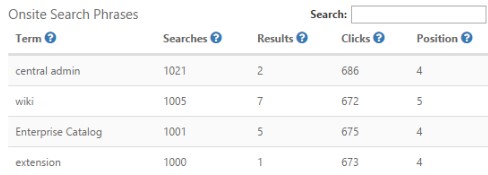
This chart from CardioLog Analytics shows the most popular search phrases. Other helpful information included in the chart is:
A strong SharePoint search analytics report should show:
- Search phrase
- Number of searches
- Number of results returned
- Clicks on search results
- Average clicked result position
- Trends over time
These metrics help administrators understand not only what users are searching for, but whether those searches are successful.
For example, if hundreds of employees search for “HR policy” every month, but the most-clicked result appears in position five or six, users may be wasting time scrolling through irrelevant results before finding the right content.
That insight can lead to practical improvements, such as:
- Renaming pages or documents using employee-friendly language
- Updating metadata and page titles
- Improving content descriptions
- Promoting high-value resources on the homepage
- Adding quick links to frequently searched topics
- Creating audience-specific links on department sites
Top search terms can also guide content strategy. If employees repeatedly search for the same topic, that topic should probably be easier to access from navigation, promoted links, a knowledge base, or a frequently asked questions section.
The goal is simple: if employees search for something often, make it easier to find.
2. Failed search Terms:
Failed search terms are searches that return no useful results, or no results at all.
This is one of the most valuable search optimization metrics because it shows where the intranet is failing to meet user needs.
A failed search may happen because:
- The content does not exist
- The content exists but is not indexed
- The content has poor metadata
- The page title does not match employee language
- The document uses internal terminology users do not search for
- Permissions prevent users from seeing the result
- The search scope is too narrow
Microsoft notes that SharePoint content must be indexed to appear in search results, and search results are security-trimmed so users only see content they have permission to access.
That means a failed search does not always mean the content is missing. Sometimes the problem is structure, permissions, metadata, or search visibility.
For example, if employees frequently search for “expense reimbursement” and get no results, but the official page is called “employee payment claims,” the content may technically exist but still be invisible to users in practice.
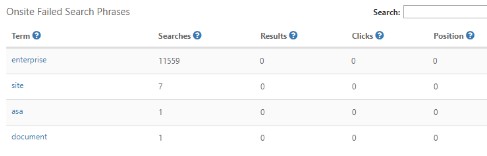
Failed search analytics can help teams decide whether to:
- Create new content
- Rename existing content
- Add common synonyms and related terms
- Improve metadata and managed properties
- Review permissions and search visibility
- Add promoted results or curated links where appropriate
- Run a short survey when users receive no results
This is where search analytics becomes actionable. It does not just show what is broken. It tells teams exactly where to improve content findability.

3. Search Usage Trends:
Search usage trends show how often employees rely on search during SharePoint visits.
This metric helps answer a larger question: are users searching because search works well, or because navigation does not?
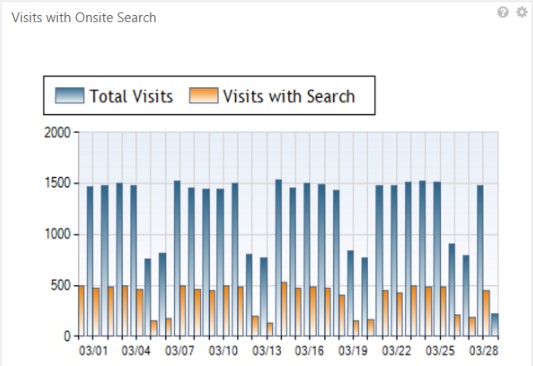
Useful trend metrics include:
- Visits that include at least one search
- Search sessions compared to total visits
- Searches per user
- Repeat searches
- Search usage by department, location, or audience
- Search usage over time
If a large percentage of SharePoint visits include search, it may indicate that employees cannot easily find information through navigation, menus, promoted links, or page structure.
If users search repeatedly within the same session, it may suggest that the first search did not return a useful result.
Search trend data helps administrators decide how much effort should go into search optimization. For example, if only a small percentage of users rely on search, it may be enough to improve the top few search journeys. But if search appears in a large share of visits, the organization may need a broader content and navigation review.
This is especially important in modern SharePoint environments, where search scope can vary depending on whether users search from a site, hub, or broader organization context. Microsoft explains that in modern SharePoint sites, search can default to the current site, with options to expand to the hub or the whole organization.
Search analytics helps teams understand whether users are finding what they need within the current structure or whether content needs to be reorganized, promoted, or better connected.
Why SharePoint Search Analytics Matters
SharePoint search optimization is not just a technical task. It directly affects employee experience, intranet adoption, and productivity.
When search works well, employees can:
- Find policies faster
- Access documents with less frustration
- Discover relevant pages and resources
- Trust SharePoint as a reliable knowledge hub
- Spend less time asking colleagues for links
- Complete work with fewer interruptions
When search performs poorly, employees lose confidence in the portal.
That is why SharePoint search analytics should be reviewed regularly, not only during intranet redesigns or migrations.
How CardioLog Analytics Helps Optimize SharePoint Search
CardioLog Analytics provides SharePoint and Microsoft 365 analytics that help organizations understand how employees search, navigate, and engage with intranet content.
With CardioLog Analytics, teams can monitor search behavior, identify popular search terms, uncover failed searches, analyze user journeys, and understand how search impacts SharePoint adoption.
These insights help digital workplace, IT, and communications teams improve content findability, optimize intranet navigation, and make SharePoint easier for employees to use.
CardioLog Analytics is available as a SaaS or on-premises solution and supports analytics for modern Microsoft 365 and SharePoint environments.
CardioLog Analytics monitors a variety of metrics within the SharePoint portal, including search, to provide an in-depth view of the environment. It enables organizations to improve intranet usability, drive portal collaboration, boost user engagement, and enhance overall business productivity. The solution is available as an On-Premises or SaaS solution, with the ability to track SharePoint Online (Microsoft 365), SharePoint Subscription Edition, SharePoint 2016, Viva Engage, and Teams.
Final Takeaway
Improving SharePoint search starts with understanding real user behavior.
The three most important metrics to monitor are:
- Top search terms
- Failed search terms
- Search usage trends
Together, these metrics show what employees need, where search is failing, and how search behavior affects the overall SharePoint experience.
By using SharePoint search analytics, organizations can improve findability, reduce frustration, and increase adoption across the digital workplace.
Related Topic: The Benefits of using SharePoint and its Amazing Features












 Follow @cardiolog